Insanely Great Billing: Why We Built a New Platform

13 min Read
At most firms, one person owns billing, every problem arrives on the same two days, and the software hands the last mile back to you to finish by hand. This is what we built instead, and why: a system anyone on your team can run, that finds the problems weeks before you need them found, produces a file that is right when it is generated, and then tells you something about your business you did not already know.
Billing day should be boring.
You log in. Nothing is flagged. You look at the accounts, look at the fees, look at the handful of exceptions, and approve. That’s the whole thing.
For most advisors, it isn’t the whole thing.
The Billing Person
Start with who runs it. At most firms, one person can. Not because they’re hoarding anything. Because billing software has mostly been built for people who do billing for a living. It assumes you know what an accrual method is and why you’d pick one. It buries the setting that matters three menus deep, next to four settings that sound identical. Whoever ran it last quarter is the only one who’s paid enough tuition to run it this quarter. So it’s always the same person, and everyone else stays away from it.
Then there’s when it happens.
The Billing Fire Drill
For most firms, billing is an event. It sits quiet for eleven weeks and then arrives all at once. And everything you didn’t know about shows up on the same two days. The account that opened in February and never got a fee schedule. The account somebody excluded back in March that nobody has looked at since. The six new accounts that haven’t been assigned to a client and can’t be billed. The client who funded mid-quarter and needs prorating. None of that is new information. It’s been true for weeks. You just had no ability to look until the day you had to bill, and now you’re finding out under a deadline with clients waiting.
That’s the fire drill. Every quarter, the same one, and it never gets shorter.
The Mandatory Cleanup
And then, once you’ve fought through all of it, the software hands the last mile back to you.
One advisor we talked to spent part of every cycle, before he came to Blueleaf, deleting rows by hand. Sometimes a hundred and fifty of them, because his old system couldn’t tell a zero-fee account from any other account and shipped them all to the custodian anyway. Another was paying a 2nd advisor on the book he managed every month, so he’d export a report, drop it in a spreadsheet, total up thirty-odd accounts, and cut a check.
That’s not billing software doing a job. That’s an advisor doing the job, with billing software watching. And it happens after the hard part, when you thought you were finished.
Three problems, one pattern: work the software could have done, left for the advisor to do under a deadline.
Nobody had fixed any of this. So it stayed.
We went after all three.
Built to Be Obvious for Everyone
The last time you ran billing was ninety days ago. You should not have to relearn anything.
So we spent most of our time on the parts nobody puts in a demo. What the buttons say. Where they sit. Whether the label on a setting means what you’d assume it means. We use your words, not an accountant’s, so nothing needs translating. And the workflow tells you where you are and what’s next, instead of leaving you to remember.
Four steps. Review the accounts. Review the fees. Clear the exceptions. Approve. That’s the shape of it, every time, so it’s the same three months from now as it was today. Anyone on your team can run it. Not because we wrote better documentation, but because there’s less to know.
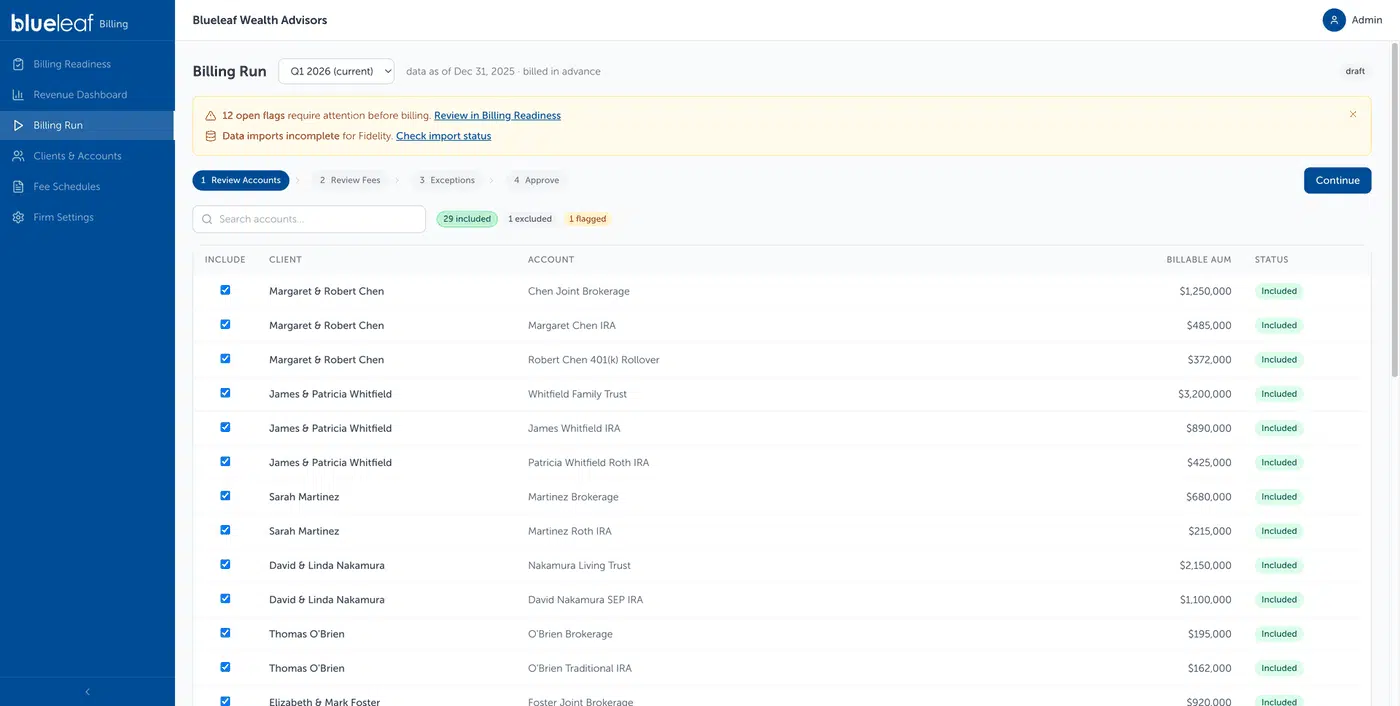
Four steps, in the same order every cycle.
Proactive Cleanup Between Billing Cycles
Most billing systems can’t tell you anything until you run billing.
That’s the trap. The only way to find out what’s wrong with this cycle is to calculate the cycle, and you calculate the cycle when it’s time to bill. So the problems and the deadline arrive together, by design. Not because anyone chose that, but because the software has no idea what your fees look like until you ask it to work them out, and you only ask at the end.
We run it continuously instead. The next cycle is being calculated off today’s data, all quarter, whether you’re thinking about billing or not. You can open the projected run at any point in the period and see what you’re heading toward before the period closes.
And then we alert you on everything we see.
An account looks short on cash to cover the fee. We alert you. A new account came in with no billing schedule. We alert you. A client’s fee jumped enough to be worth a second look. We alert you. Accounts sitting unassigned, a custodian that hasn’t sent the balances your run needs, an AUM swing that doesn’t look right. All of it, as we find it.
One Daily Alert Digest tells you when there’s something to deal with, and it only shows up when there is. The work happens in Billing Readiness, sorted so the items that need a decision sit above the ones that are just worth knowing. Check in when you have five minutes and it tells you what’s outstanding for the current period and the next one.
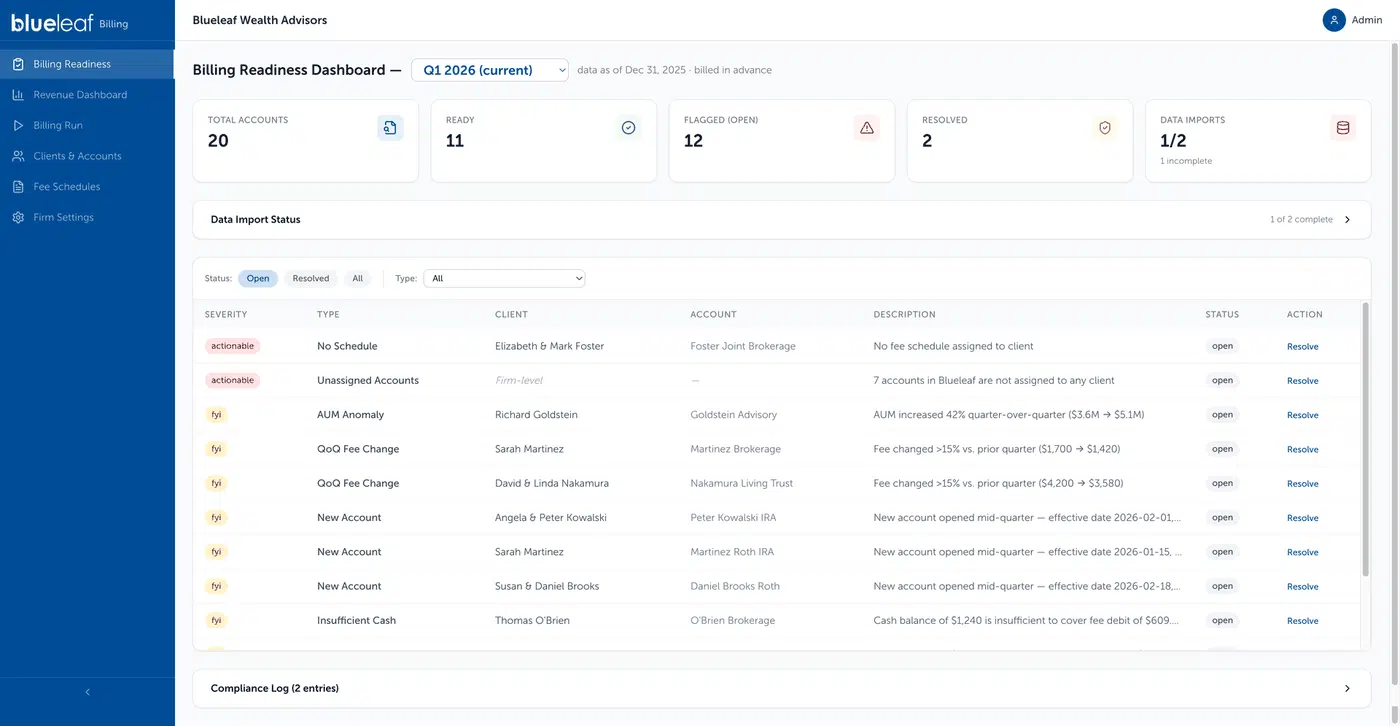
Everything we find, as we find it.
Take the cash one. In week three, you raise cash in the account, and nobody ever knows there was a question. In week twelve, it’s a failed debit, a fee that didn’t collect, and a cleanup you’re doing on the client’s behalf while they wait. Same problem. Nine weeks of difference.
You get told, you go fix it, you’re out in five minutes. Do that a few times across a quarter, and there’s nothing left to find at the end.
The File Is Right the First Time
Every manual fix at the end of a cycle is a failure, and they all come back to the same thing. The system isn’t flexible enough to be set up the way you actually bill.
Sometimes that’s obvious. There’s no way to express the arrangement at all, so the system produces something close, and you correct the difference by hand every time.
More often it’s quieter. You can get the right answer, but only by adjusting the output after the fact. And an adjustment made to the output is gone the moment the run closes. There’s nowhere for it to live. So next cycle you make it again, and the cycle after that. That client with two fee streams, where you add the second line by hand every time. You’re not solving a hard problem over and over. You’re doing the software’s remembering for it, because it was never able to hold the instruction in the first place.
A correction made to the output dies when the run closes. A system configured the way you actually bill has somewhere to put it.
That’s the fix. Not a better memory bolted onto a rigid system. A system flexible enough to be configured the way you bill, so there’s something worth remembering.
Exclude an account permanently or just for this run. Keep zero-fee accounts out of your billing runs for good, so they never reach the export at all. Prorate a client who funded in week six. Set an exception on one account inside a household that otherwise bills together. Charge a flat fee alongside an AUM fee on the same client. Draw a fee from an account at a different custodian, or keep it out of the custodial draw entirely and bill the client directly.
Set it up once, and it holds. The file comes out the way you’d have fixed it anyway.
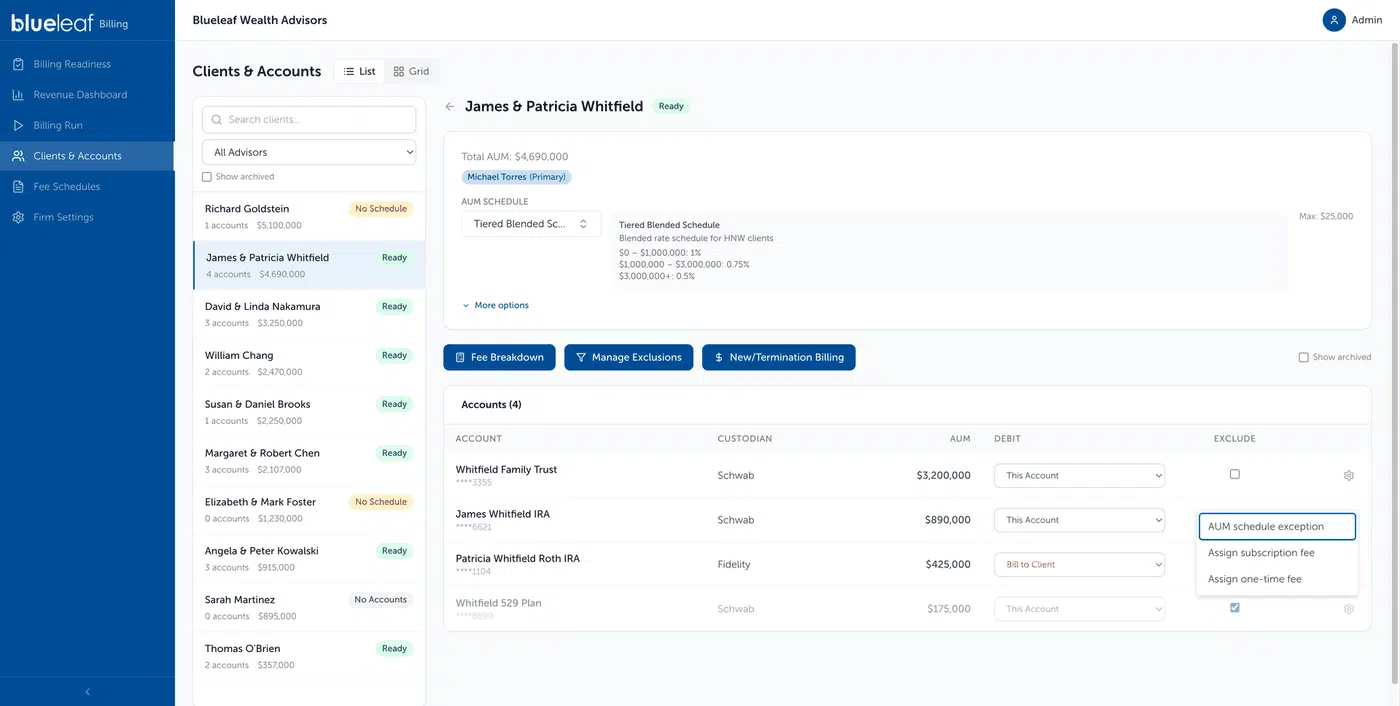
Per-account decisions that survive the run.
Do that, and approval day stops being a day. You open it, nothing’s flagged, and you approve. The work already happened.
But You’re Still Going to Check
Now I know what you’re thinking, because every vendor says their new thing is simpler. Every vendor says, “Trust us.”
So let’s talk about the habit you probably have, which is checking.
Almost every advisor I’ve watched run a billing cycle checks the numbers before the bill goes out. Not because they’re paranoid. Because at some point the software got it wrong, and the client is the one who found out. So the habit got built: pull the fee, pull the balance, rebuild the calculation somewhere else, see if it matches.
One advisor I talked to spot-checks ten or fifteen households against his custodian’s official statement, every cycle, before he’ll let anything go out. Another had used his billing system for years and still went back in to double-check his own fee schedules, because he’d never quite gotten to taking its word for it.
That’s what a decade of billing software teaches you. It’s a reasonable habit and I’m not going to tell anyone to drop it.
But it shouldn’t cost an afternoon.
Checking is expensive because most systems hand you an answer and hide the work. You get a fee. You don’t get how it got there. So the only way to verify anything is to rebuild the calculation in Excel from the balance up.
But watch what an advisor actually does when they check. They almost never recompute anything. They look for the thing that doesn’t make sense.
Total fees for the book have moved four percent since last quarter. Fine, markets moved about that much. Moved nineteen percent? Something happened, and you want to know what before the debits go out.
Then one client’s fee is up eleven percent while their assets are up two. Those two numbers should move together. When they don’t, there’s a reason. A schedule changed. A tier got crossed. An account came into billing that wasn’t there before. Any of those might be exactly right. You just want to be the one who decides that, instead of finding out from the client.
That’s the check. Not arithmetic. Proportion.
So we put those comparisons where you’d look for them. Every client in one table, this period against whatever period you pick: their AUM, what they paid, their effective rate, the share of your revenue they represent, and the change since the comparison period. Sort by the change, and whatever moved the most is sitting at the top of your screen.
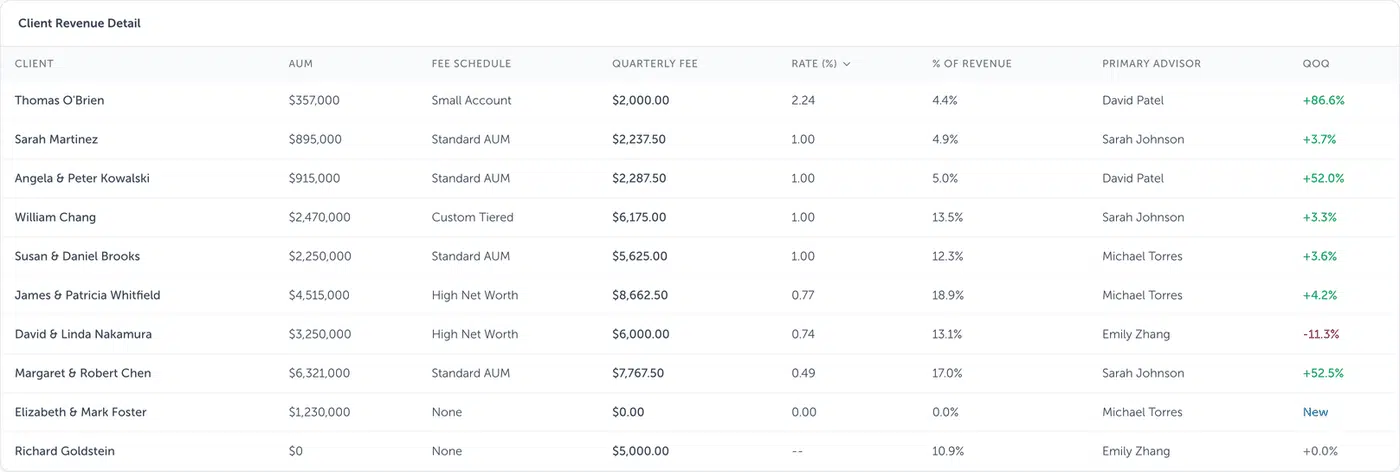
Every client, this period against the last, sorted however you want.
When something looks off, you open that client’s fee breakdown and see the whole walk in order. Total market value. What was excluded. Any cash flow adjustment. Total billable value. The rate that was applied. The amount hitting each account. And the valuation date it used, printed right there, so when the number doesn’t match the statement you pulled this morning, you know in about a second that you’re comparing two different days, not two different numbers.
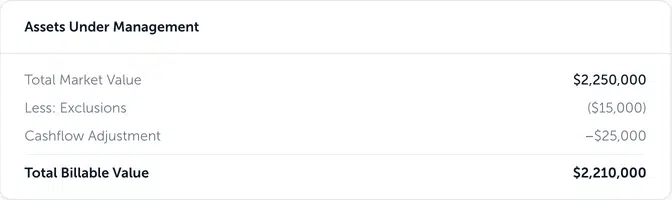
The walk, in order, on one card.
Checking goes from rebuilding to reading. Keep the habit. It just gets cheap.
A Business Partner, Not a Calculator
We think billing should do more than be simple and proactive. It should be a partner in running your business.
Because of what it’s already holding. Every fee, every client, every period, calculated and correct. That’s your revenue. Not the top line, which you already know. The composition of it.
Every advisor knows what the practice made last quarter. The harder question is which clients are actually worth having. You’ve got a household paying you 110 basis points that you speak to twice a year. You’ve got another at 40, on a legacy rate nobody’s revisited since 2016, who calls every other Tuesday and forwards you articles about gold. One of those clients is carrying your practice. The other one is being carried. You probably have a gut feeling about which is which.
A gut feeling is not the same as the number in front of you.
So we put it in front of you. Every client, their AUM, what they paid, their actual effective rate after every exception and cap and grandfathered arrangement, and what share of your revenue they represent. Sorted however you want. The whole book, ranked, in one table. Broken out by advisor and by fee type, against whatever prior period you pick. Filter to one advisor and their share of the book is already totaled, which is the spreadsheet that used to get built by hand every month.
The first time an advisor sorts that by effective rate, something usually happens. There’s a client near the bottom they’d forgotten was down there. There’s a big relationship they’d assumed was a big revenue relationship, and it isn’t, quite. Nobody needed a report to tell them that. They needed to see it laid out once.
And once it’s laid out, you can start answering questions you couldn’t before. Which relationships are actually profitable, once you weigh what they pay against what they take to serve? Where you’re undercharging, and by how much. Which legacy rates have drifted so far from your current schedule that they’re no longer a favor; they’re a subsidy. Whether the fee break you gave someone in 2019 still makes sense in 2026. Those are pricing decisions, and most advisors make them on instinct because the numbers to make them properly were never in one place.
Coming soon, we’ll take that further, benchmarking your revenue and your fee schedules against firms of similar size. Knowing your average effective rate is useful. Knowing it against your peers is a different kind of useful.
A calculator gives you a number and stops. This tells you something about your business.
What’s Coming
Most of what’s here came out of listening to advisors describe their billing week and realizing how much of it existed only because software made it exist. The deleted rows. The spreadsheet to pay an advisor. The two days at the end of the quarter that everyone plans around.
There’s more to say about each of those, and we’ll get into them. How the setup handles the arrangements that used to break your export. What the alerts catch, and how early. What the revenue view tells you about your own book once you sit with it.
For now, the fastest way to judge any of this is a single cycle. Run it. Check it the way you’ve always checked. Then look at how long it took you.
You know what you made last quarter. Do you know which ten clients decided it?
See the billing platform running on your own book in a 30-minute walkthrough. [Request a Demo]