What Advisors Actually Check Before Debiting Their Clients’ Accounts
10 min Read
Advisors spend hours every billing cycle checking what should be simple math. And while most advisors don’t literally recreate the calculations, they spend those hours sanity checking different views on the data. And to do that, they have to dig through endless screens in their software. Most advisors will never stop doing these checks, but software providers should have made these checks easy and fast. No one has until now.
Posted by Connor Prendergast
One advisory firm we talked to won’t push billing through until the custodian posts official statements. Those land on the fourth or fifth of the month. They open the statement, check the balance, and spot-check ten or fifteen households against what their billing system produced. Then they bill.
They’re not new to this. They have been on the same billing system for years, and by their own account it has never been wrong. Not once, not by a dollar. They do it anyway, every single cycle.
You could call that paranoia. It isn’t. It’s what a decade of running traditional billing software teaches you, and there are two reasons an advisor never quite shakes it. One is the client conversation, which is embarrassing in a way that lingers. The other is the compliance problem, which doesn’t care how sorry you are. Billing is the one process at a firm where the client is the person who discovers the mistake.
So they check. The question worth asking isn’t whether they should. It’s why checking costs them what it does.
Advisors look for what doesn’t make sense
Watch what advisors actually do when they review a run, and the striking thing is how little arithmetic is involved. They aren’t multiplying rates by balances. They aren’t auditing the math. They’re reading the run for the thing that doesn’t make sense.
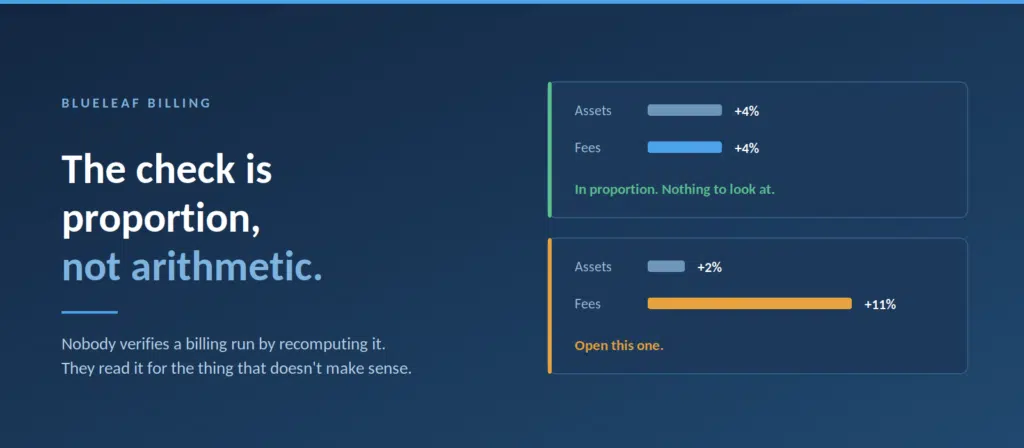
They start at the book level, because that’s where an error big enough to matter shows up first. Total fees for the quarter moved four percent. Markets moved about that much. Fine. Total fees moved nineteen percent and something happened. They don’t know what yet, and that is exactly the point. They want to know what before the debits go out, not after.
The check is proportion, not arithmetic.
Then they go one level down, and it gets specific. A client’s fee is up eleven percent and their assets are up two. Those two numbers are supposed to move together. When they don’t, there is always a reason: a fee schedule changed, an account crossed into a new tier, an account came into billing that wasn’t in the last run. Any one of those might be perfectly correct.
They just want to be the ones who decided it was correct, rather than hearing about it from the client.
So why does it take an afternoon?
Because most billing systems hand you an answer and hide the work.
The number on the screen is the end of a calculation you can’t see, so the only way to check it is to build it again yourself. You pull the balance. You apply what you believe the rate is. You adjust for what you believe came out. You compare.
And when your number lands forty dollars away from the system’s number, you have learned nothing at all, because forty dollars could be a deposit that landed inside the period, a security the client’s schedule excludes, a cash flow adjustment, or the fact that the run valued the account on a date that isn’t the date you’re reading from.
That last one is the cruel version, because nothing is wrong. You’ve just spent twenty minutes discovering that two correct numbers describe two different days.
Checking is cheap. Proving is expensive. Nearly the whole afternoon goes to proving.
How Blueleaf makes this fast
You can scan your entire book, in the first ten seconds
The revenue dashboard opens on the period you’re billing, with a comparison period sitting next to it. Five figures run across the top: firm AUM, revenue for the period, annualized revenue, average fee rate, and how many of your clients billed something. Under the first four, the change against whatever period you chose to compare to.

Blueleaf Billing Revenue Dashboard
That is the book-level check, and it’s already done before you sit down. Assets moved this much. Revenue moved this much. The two figures are next to each other, which is the entire point, because neither one means anything on its own. Change the comparison period and everything updates.
If those numbers moved together, most quarters end right there.
Checking all your clients becomes a simple scan of an existing list
Client Revenue Detail lists every client in the period: assets, the schedule they’re on, the fee, their annualized rate, their share of firm revenue, their primary advisor, and the change against the comparison period. Click any heading to sort by it. A client who wasn’t in the comparison period at all is marked New, which answers one of those three questions from a minute ago before you’ve finished asking it.
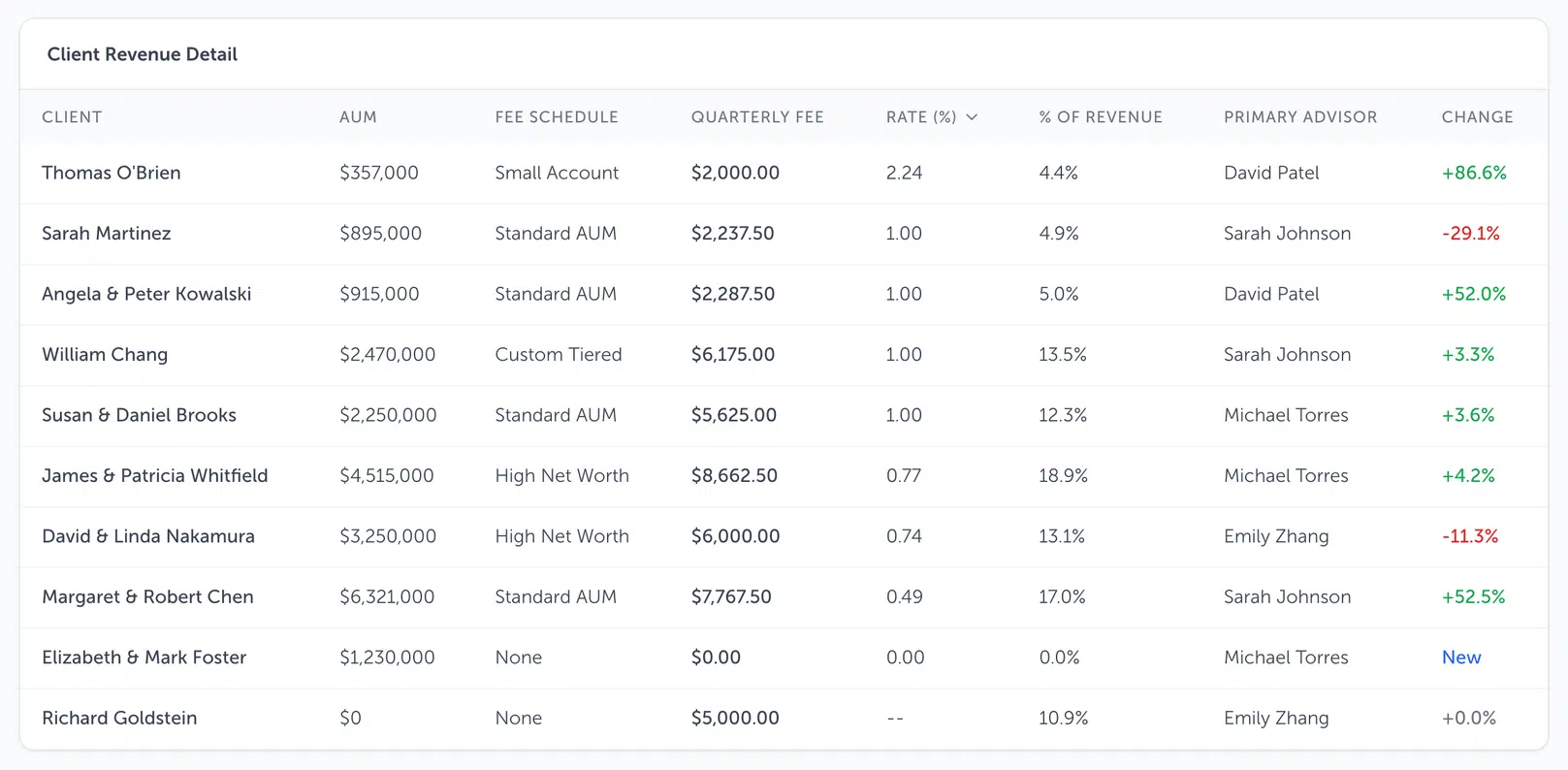
Every client, the rate they actually pay, and what changed.
The annualized rate is the proportion check in a single number. It’s the fee measured against the assets, so when the two move together it holds steady, and when they don’t it moves. Sort on it and the clients you were going to go looking for are sitting at the top of the list.
For the biggest movers you don’t have to go looking at all. In firm settings there are two toggles, flag AUM anomalies and flag fee changes, each with a threshold you set yourself. An account that moves more than that against the prior period gets flagged while the run calculates, and the flag carries the size of the move and the figures behind it. Movement in either direction counts, so a fee that dropped twenty percent is as interesting as one that rose.
Neither flag stops your billing. They aren’t gates, and they aren’t meant to be. They’re the system telling you where it would look if it were you. Set the threshold wide to begin with, then tighten it once you’ve seen how much movement is ordinary for your book.
Diving in on any client is just a click away
Open a client’s fee breakdown and the calculation is laid out in the order it happened.
Total market value at the top. Less exclusions, where any applied. The cash flow adjustment, where there was one. Total billable value. Then the fee schedule. On a tiered schedule that means every tier with its range, its rate, and the dollars that landed in it, down to the annual fee and the effective annual rate. Then each account the run billed: billable value, fee assessed, and the amount debited from that account, with a dash in that column where nothing is drawn because the fee is coming from somewhere else.
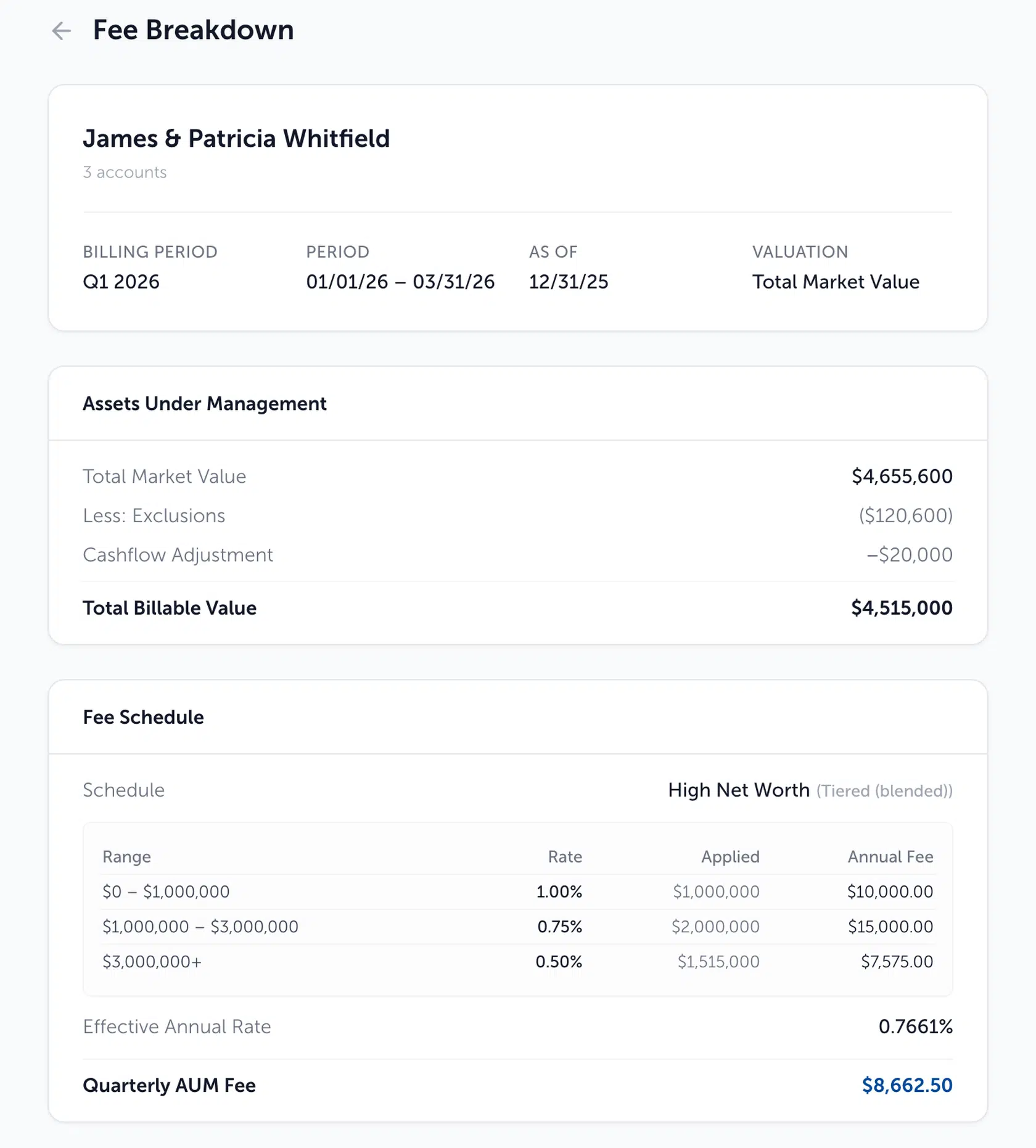
Blueleaf Billing Fee Breakdown
That’s the entire check. The schedule, the tier, the account that wasn’t there last time: all three explanations are visible on one screen, without inference and without a spreadsheet, because the spreadsheet you were going to build is the screen.
And printed at the top of it: the date the balances were read.
That one field settles the most common false alarm in billing. A run values as of a closed period end, never a live balance. Under advance billing that is the end of the previous period, so a Q1 run reads December 31. The statement on the advisor’s desk reflects a different day. Both numbers are right. Twenty minutes of reconciliation becomes one second of reading a date.
The cent-level version has an answer too. Assets display to the nearest dollar, fees to the cent, rates to four decimal places, so multiplying what you see on screen gets you near the fee rather than exactly onto it. A penny or two is the display, not the calculation.
Staying ready for audit without the extra work
There’s a scenario every compliance-minded advisor recognizes.
Something looked odd. You looked into it. You found the explanation, decided the fee was right, and billed. That was March. It is now October, and someone is asking what you checked and what you concluded.
At most firms the honest answer is that it’s gone. It was a phone call nobody recorded, an email that got cleaned out, a conversation with a colleague who remembers it slightly differently, or a decision you made at your desk on a Tuesday and never wrote down anywhere. You did the right thing. You simply have no way to show that you did.
The question was never whether you did the right thing. It’s whether you can show it.
So the checking gets recorded as you do it. When you resolve a flag, you write what you found, and the entry is stored with the flag itself: the date, the flag type, the client and account it applied to, and your note. It sits in the compliance log at the foot of billing readiness. Reading the log doesn’t require the permission that resolving a flag does, so the person who reviews the record doesn’t have to be the person who made it.
One thing worth saying plainly, because the software will happily let you skip it. Resolve a flag without typing anything and the entry reads “Resolved.” That is a record that you closed something and no record of why you were comfortable closing it. The thirty seconds it takes to write “checked against the December statement, tier crossing at $2M, fee is correct” is the difference between an entry that proves something and an entry that proves you clicked a button.
We may not eliminate double checking but we’ll make it lightning fast
We’re not claiming you’ll stop checking. You shouldn’t, and you won’t, and an advisor who has been burned once by a billing system is right not to take ours on faith either.
Hours of rooting around and Excel work become a series of brief scans.
You read two numbers at the book level. You sort the client list by whatever moved most and read the top of it. If nothing is out of proportion, you’re finished, and that took a couple of minutes. When something is out of proportion, you open that one client and see the entire calculation, which takes a couple more.
The judgment stays with the advisor, which is where it belongs. It was always the valuable half. What goes is the labor. The firm that waits for statements will probably keep waiting for statements for a while yet, and that’s fine. What they should never have to do again is rebuild a calculation in Excel to find out that two correct numbers describe different days.
Getting billing right and being confident it’s right are two different jobs. Most billing software does the first one and leaves you holding the second.
The afternoon an advisor spends proving out a run isn’t the price of being careful. It’s the price of software that couldn’t show its work. Careful should be free. So should prove it.
See what a billing run looks like when it shows its work. Book a walkthrough.
Blueleaf Billing calculates fees continuously, flags what needs attention before the cycle closes, shows the full calculation behind every client’s fee, and records what you checked and why. Billing that’s obvious to anyone at the firm, provable to anyone who asks.